Showing posts with label Interfaces. Show all posts

Monday, February 17, 2020

Extensions: Extend a macro without overlay - pack/unpack

I have a class that implements SysPackable. When I extend this class I want also to extend the list of variables in the macro.

Note: in Ax 2012 you don’t have SysPackExtensions.
otherwise see here: https://docs.microsoft.com/en-us/dynamics365/fin-ops-core/dev-itpro/extensibility/extend-runbase-class

class EF_SysPackableTrial implements SysPackable
{
    Description description;
    str myString;

    #define.CurrentVersion(1)
    #define.version1(1)
    #localmacro.CurrentList
    description,
    myString
    #endmacro
}

public container pack()
{
    return [#CurrentVersion, #CurrentList];
}

public boolean unpack(container packedClass)
{
    int version     = runbase::getVersion(packedClass);

    switch (version)
    {
        case #CurrentVersion:
            [version,#CurrentList] = packedClass;
            return true;
        default :
            return false;
    }

    return false;
}

public static EF_SysPackableTrial create(container _pack)
{
    EF_SysPackableTrial cl = new EF_SysPackableTrial();

    cl.unpack(_pack);
    return cl;
}

public Description parmDescription(Description _description = description)
{
    description = _description;

    return description;
}

public str parmMyString(str _myString = myString)
{
    myString = _myString;

    return myString;
}

in the extend class I modified the pack and unpack methods

class EF_SysPackableTrialExtend extends EF_SysPackableTrial
{
    Name name;

    #define.CurrentVersion(1)
    #define.version1(1)
    #localmacro.CurrentList1
    name
    #endmacro
}

public container pack()
{
    container ret;
    
    ret = [#CurrentVersion, [#CurrentVersion, #CurrentList], [#CurrentVersion, #CurrentList1]];
    
    return ret;
}

public boolean unpack(container packedClass)
{
    int version = SysOperationHelper::getVersion(packedClass);

    switch (version)
    {
        case #CurrentVersion:
            [version,#CurrentList] = conPeek(packedClass,2);
            [version,#CurrentList1] = conPeek(packedClass,3);
            return true;
        default :
            return false;
    }

    return false;
}

public static EF_SysPackableTrialExtend create(container _pack)
{
    EF_SysPackableTrialExtend cl = new EF_SysPackableTrialExtend();

    cl.unpack(_pack);
    return cl;
}

public Name parmName(Name _name = name)
{
    name = _name;

    return name;
}

and here a simple job to prove it works fine:

static void EF_SysPackableTrialExtend(Args _args)
{
    EF_SysPackableTrialExtend EF_SysPackableTrialExtend, sysPackableTrial1;

    EF_SysPackableTrialExtend = new EF_SysPackableTrialExtend();
    EF_SysPackableTrialExtend.parmDescription('ciao1');
    EF_SysPackableTrialExtend.parmMyString('ciao2');
    EF_SysPackableTrialExtend.parmName('pp');

    sysPackableTrial1 = EF_SysPackableTrialExtend::create(EF_SysPackableTrialExtend.pack());

    info(sysPackableTrial1.parmDescription());
    info(sysPackableTrial1.parmMyString());
    info(sysPackableTrial1.parmName());
}

I posted this sample also on the forum https://community.dynamics.com/ax/f/microsoft-dynamics-ax-forum/380610/extensions-extend-a-macro-without-overlay---pack-unpack-in-ax-2012

Friday, December 6, 2019

SysExtension framework for Dynamics Ax example

The benefits of using this new extension model are that the base and derived classes are decoupled, and it takes less code to extend the capability of the Microsoft Dynamics AX application.

The getClassFromSysAttribute method works by searching through the classes that are derived from the our base class (EF_ExtFrameworkSample6) until it finds a class that has matching attribute

The input value of the attribute class can be anything, an enum, a string, an integer. For this example I used the class name as input.

1) Create the attribute class

As you see I added in the attribute class also a generic static method that can be used by any extension that might use this attribute

class EF_ClassNameAttribute extends SysAttribute
{
    ClassName className;
}
public void new(ClassName _className)
{
    super();
    className = _className;
}
public ClassName parmClassName(ClassName _className = className)
{
    className = _className;

    return className;
}
//this method should be in the factory class, not here.
//I took the liberty to put it here becuse I might want to share it with multiple factory classes.
public static Object getClassFromSysAttribute(ClassName _baseClassName, ClassName _className)
{
    EF_ClassNameAttribute attr;
    Object cl;

    attr = new EF_ClassNameAttribute(_className);
    cl = SysExtensionAppClassFactory::getClassFromSysAttribute(_baseClassName, attr);

    if (!cl)
    {
        throw error(Error::wrongUseOfFunction(_baseClassName));
    }

    return cl;
}


2) Create the base class

the base class does not need to be abstract, but is a good practice

abstract class EF_ExtFrameworkSample6
{
    Name name;
    MethodName functionName;
}
abstract protected void init()
{
}
public void run()
{
    this.init();
    info(strFmt('Hello my name is %1', name));
    info(strFmt('the class that run is %1', functionName));
}


3) Create the Extensions


[EF_ClassNameAttribute(classStr(EF_ExtFrameworkSample6_1))]
class EF_ExtFrameworkSample6_1 extends EF_ExtFrameworkSample6
{
}
protected void init()
{
    name = 'Pippo';
    functionName = funcName();
}
[EF_ClassNameAttribute(classStr(EF_ExtFrameworkSample6_2))]
class EF_ExtFrameworkSample6_2 extends EF_ExtFrameworkSample6
{
}
protected void init()
{
    name = 'Topolino';
    functionName = funcName();
}


4) Create the Factory class


class EF_ExtFrameworkSample6Factory
{
}
protected void new()
{
}
public static EF_ExtFrameworkSample6 newFromClassName(ClassName _className)
{
    return EF_ClassNameAttribute::getClassFromSysAttribute(classStr(EF_ExtFrameworkSample6), _className);
}
public static EF_ExtFrameworkSample6 newFromSample6_1()
{
    return EF_ExtFrameworkSample6Factory::newFromClassName(classStr(EF_ExtFrameworkSample6_1));
}
public static EF_ExtFrameworkSample6 newFromSample6_2()
{
    return EF_ExtFrameworkSample6Factory::newFromClassName(classStr(EF_ExtFrameworkSample6_2));
}
//just for trials...
public static void main(Args _args)
{
    EF_ExtFrameworkSample6 cl;
    cl = EF_ExtFrameworkSample6Factory::newFromSample6_1();
    cl.run();
}

image

One side note, The extension framework cache so every time you do some changes during development clear the cache :

static void JobEF_SysExtensionCache(Args _args)
{
    SysExtensionCache::clearAllScopes();
}

Monday, September 9, 2019

Simulated Multiple Inheritance fox x++ in Dynamics Ax

We all know that in X++, a class can only extend one class; multiple inheritance is not supported in X++ and to overcome that we can use Interfaces. What I never saw is an example of multiple inheritance in X++. Instead I saw someone saying it’s a bug! I don’t know if was serious or a was making a joke…

Let’s start making things clear:

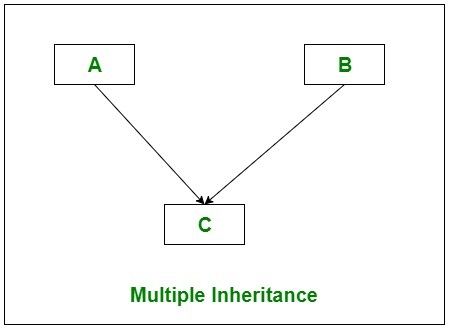
In Multiple inheritance, one class can have more than one superclass and inherit features from all its parent classes. As shown in the below diagram, class C inherits the features of class A and B.

Most recent languages like C# support only simple inheritance. They don't have multiple inheritance because their designers had to choose between have it in and have all the problems it comes with, or get it out of the language putting away all those problems, and introduce a versatile and less problematic substitute like interfaces and interface inheritance.
Multiple inheritance has a pathological problem:

Imagine, we want to have a class Child which inherits from Parent classes ParentA and ParentB. Both classes have the same methods MethodA and MethodB.
Now, when we instantiate the Class Child then calling MethodA will confuse the compiler that does not know from which class MethodA should be called.

The traditional way to emulate multiple inheritance with interface inheritance.

Let us see how to simulate multiple Inheritance in X++

image

first we create the interfaces

interface EF_IMultipleInheritaceBaseClass1
{
}
public void x()
{
}
public void y()
{
}

interface EF_IMultipleInheritaceBaseClass2
{
}
public void z()
{
}

next we can create two classes that implement those interfaces

class EF_MultipleInheritaceBaseClass1 implements EF_IMultipleInheritaceBaseClass1
{
}
public void x()
{
    info(funcName());//it shows the class and method name
}
public void y()
{
    info(funcName());
}

class EF_MultipleInheritaceBaseClass2 implements EF_IMultipleInheritaceBaseClass2
{
}
public void z()
{
    info(funcName());
}

now we are ready to create our abstract class that implements the two interfaces

abstract class EF_MultipleInheritaceBaseClass1And2 implements EF_IMultipleInheritaceBaseClass1, EF_IMultipleInheritaceBaseClass2
{
    EF_IMultipleInheritaceBaseClass1 class1;
    EF_IMultipleInheritaceBaseClass2 class2;
}
protected void new()
{
    class1 = classFactory.createClass(classNum(EF_MultipleInheritaceBaseClass1));
    class2 = classFactory.createClass(classNum(EF_MultipleInheritaceBaseClass2));
}
public void x()
{
    class1.x();
}
public void y()
{
    class1.y();
}
public void z()
{
    class2.z();
}

finally we can extend our abstract class and bingo, we simulated multiple inheritance:

class EF_MultipleInheritaceClass1And2 extends EF_MultipleInheritaceBaseClass1And2
{
}
public static EF_IMultipleInheritaceClass1And2 construct()
{
    return new EF_IMultipleInheritaceClass1And2();
}
public static void main(Args _args)
{
    EF_IMultipleInheritaceClass1And2 class1And2;
    class1And2 = EF_IMultipleInheritaceClass1And2::construct();
    class1And2.x();
    class1And2.y();
    class1And2.z();
}